▤
Customer portals
We build portals where customers can check orders, download documents, send messages and track progress. The portal uses your terms and your steps, so customers need less help and your team answers fewer repeat questions.
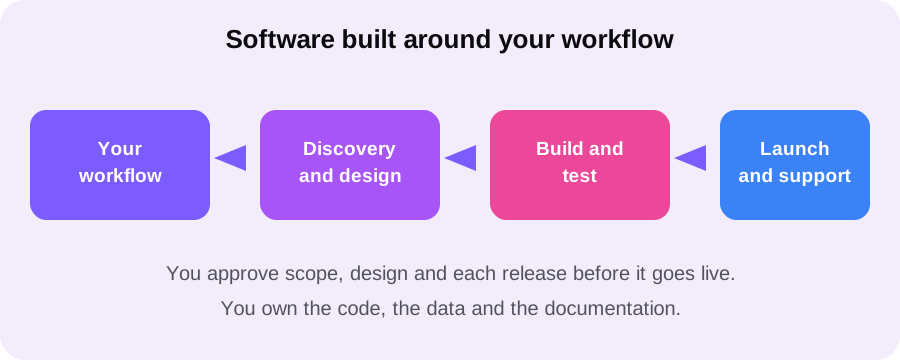
We provide custom software development services for teams whose work no longer fits a ready made tool. We build software around your workflow, your data and your users, so daily work gets simpler, not more complicated.
This is a static preview, not a live product. It shows the kind of clear layout your portal could use.
Your portal would use your fields, your terms and your approval steps.
Most teams do not start with custom software. They start with a ready made tool, and for a while it works. Then the team grows, the workflow changes, and the tool starts to fight back. Staff add spreadsheets beside it, copy data by hand, and build workarounds that only one person understands. The software is still running, but the work around it keeps growing.
That is the point where a custom software development company can help. Instead of asking your team to change how it works, we build software that follows your workflow. The screens match the steps your team already takes. The fields match the data you actually collect. The approvals match the people who must sign off. Work feels lighter because the tool was built for it.
Our software development services are for teams that know their process well and want software to support it, not replace it with a generic one. We start by mapping the workflow with you, including the exceptions and edge cases that ready made tools usually ignore. Then we build in stages, so you can use and approve each release before the next one starts. You stay in control, and the result stays close to real work.
Custom software is not one product. It is a set of project types, each shaped by who uses it and what job it must do. The six types below cover most of the work our clients ask for, and they often combine. A portal can sit on top of an internal tool, and an API can connect both to a system you already run.
We build portals where customers can check orders, download documents, send messages and track progress. The portal uses your terms and your steps, so customers need less help and your team answers fewer repeat questions.
We build internal tools and admin panels that replace spreadsheets and manual checks. Staff see only the records their role allows, and routine tasks such as approvals, updates and reports take fewer steps.
We build SaaS development products from an MVP development release to a full product, with accounts, billing readiness, and admin controls. Each release is tested with real users before the next set of features is added.
We build mobile apps for field teams and customers who work away from a desk. The app carries the same workflow as the web system, with clear screens and simple steps that work on a small screen.
We provide API development that connects your software to other systems, so data moves without retyping. Integrations follow clear rules for access, errors and logging, so a failed sync is visible and easy to fix.
We provide legacy application modernization for software that still runs the business but is hard to change. We rebuild it in stages, keep the data safe, and keep the old system running until the new one is proven.
A good way to judge custom software is by the job it does. Each use case below is a project type, not a named client story. In each case, the outcome is simple: fewer manual steps, fewer errors, and a clearer view of the work.
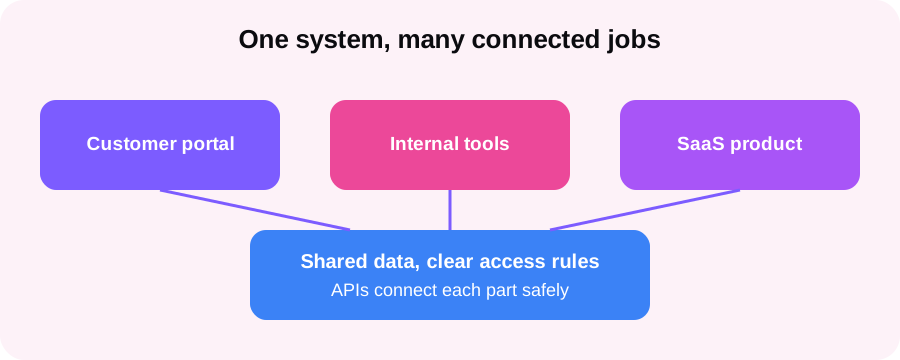
A portal and an internal tool can share one record, so a request, its documents and its status stay together. Staff stop searching across inboxes, and customers stop asking for updates.
An internal tool can turn a manual checklist into a guided workflow, with approvals and an audit trail. Work moves in order, exceptions are visible, and managers see where a job is stuck.
A SaaS product can start as a focused MVP, tested with real users, then grow feature by feature. Early feedback shapes the roadmap, so later work is built on evidence, not guesses.
API integrations can connect a CRM, a billing tool and an internal system, so one update flows to each place. Staff enter data once, and reports draw on the same source.
Legacy modernization can rebuild an old system piece by piece, starting with the part that causes the most pain. The business keeps running, and risk stays low because each piece is proven before the next begins.
A mobile app can give field staff the same workflow as the office system, with forms, photos and status updates from the job site. Office staff see the update at once, without waiting for a phone call or a paper form.
Technology choice is not a matter of taste. It depends on who will use the software, how much data it must handle, which systems it must connect to, and who will maintain it later. That is why we do not fix the stack in advance. In discovery, we review your systems, your data and your team, then recommend a stack you can understand and maintain.
A microservices design splits a large system into smaller parts that can change on their own. That suits larger enterprise software development, where different teams own different parts. A simpler design, with one clear codebase, suits a smaller product better, because it is easier to test and maintain. We explain the trade-off in plain terms, so you can choose with full information.
We build interfaces with React, Angular, Vue.js or Next.js, chosen for the screens your users need. The goal is a fast, clear interface that works on desktop and mobile, with simple steps and readable text.
We build the back end with .NET, Django, Laravel or Node.js, and Python or Java where they fit the task. PostgreSQL stores the core data, with clear rules for access, backups and change history.
We deploy on AWS, Google Cloud or Microsoft Azure, with Docker and Kubernetes where scale requires it. CI/CD pipelines and DevOps practices support tested releases, so updates reach users safely and can be rolled back if needed.
The table below compares a custom build with a typical ready made tool. Neither choice is right for every team. The comparison helps you see which trade-offs matter for your workflow, your budget and your plans.
| What to compare | With Esaholic | Typical ready made tool |
|---|---|---|
| Workflow fit | Built around your steps, fields and approvals | Your team adapts to the tool's fixed steps |
| Features | Only what your team needs, nothing extra to learn | Many features, most unused, still paid for |
| Integrations | APIs built for the systems you already run | Limited connectors, with workarounds for the rest |
| Ownership | You own the code, data and documentation | You rent access, and export can be limited |
| Change | Changes follow your roadmap and priorities | Changes follow the vendor roadmap and release dates |
| Scale | Architecture grows with users, data and teams | Higher tiers and limits arrive as use grows |
Quality is not a final check. It is built into each release. We test the workflow with real examples, including the exceptions your team meets in daily work, and we fix problems before a release reaches users. Automated tests guard the core steps, so a later change cannot quietly break an earlier feature.
Security follows the same pattern. Role-based access means each person sees only the records their job requires. Sensitive actions are logged, so your team can see who changed what. Where your business requires it, we design for readiness under ISO 27001, SOC 2, HIPAA, GDPR and PCI DSS, alongside your own legal and security reviewers. Readiness means the system is built to support a review, not a claim that Esaholic holds a certification for your product.
Ownership is agreed in writing before build starts. You own the code, the data and the documentation we create for your project, and we hand over in a way your team or another provider can continue. Documentation covers the workflow, the data model, the integrations and the admin steps, so the product does not depend on memory alone.
Engagement models describe scope and working style, not a price list. After discovery, we agree one model for the first phase, with a fixed scope and price. You can change models later as the product grows, with the change agreed in writing.
A defined scope, a defined set of releases and a fixed price for that phase. This model suits a clear product, such as a portal or an MVP, where the workflow is already well understood.
A team that works on your product across phases, learning your workflow in depth. This model suits a growing SaaS product or a system with a steady roadmap.
Our developers join your existing team for a defined part of the work, such as API development or a rebuild. Your team keeps direction, and we add the skills a phase requires.
We take responsibility for delivery across design, build, launch and support, with regular reviews and approval points. This model suits teams that want one accountable partner for the full cycle.
Our full-cycle software development process keeps each stage small enough to approve. You never face a long silent build followed by a surprise. Each stage ends with something you can use, test and approve, and the next stage starts only when you are ready.
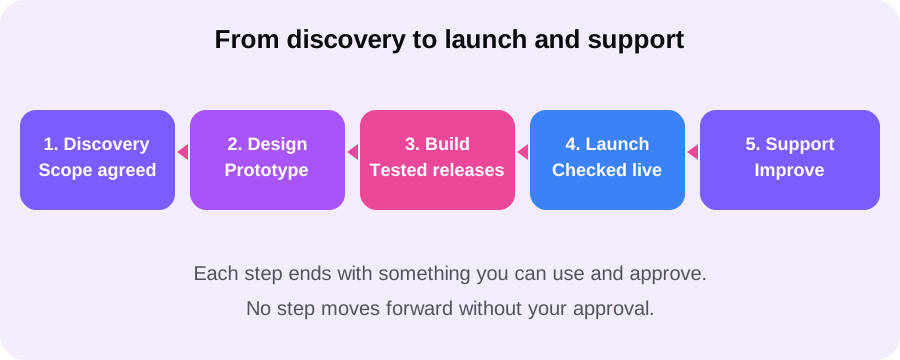
We map your workflow, systems, data and risks with you. You receive a fixed scope and price for the first phase, and a clear view of what the first release will and will not include.
We design the screens and the workflow, then build a prototype you can click through. Your team tests it with real tasks and asks for changes before any full build starts.
We build in tested releases, each one covering a clear part of the workflow. You approve each release, and automated tests guard the steps that already work.
We launch to a controlled group first, check real use, fix issues, then widen access. Training and documentation help your team run the product from day one.
After launch, we support the product with fixes, updates and small improvements, under our support and maintenance services. The roadmap grows from real use, not guesses.
You receive more than code. At each stage you receive something your team can check, use and keep, so the project stays visible and the product stays yours.
After discovery, you receive a written scope, a release plan and a fixed price for the first phase, with exclusions stated plainly.
Each release is working software, tested on your workflow, with release notes that say what changed and what to check.
You receive documentation for the workflow, data, integrations and admin steps, plus training for the people who will run the product.
After launch, you receive support for fixes and updates, with a monthly review of issues, changes and next steps for the product.
Custom software development solutions work best when the scope is honest. If a ready made tool would serve you better, or if the workflow is not yet clear enough to build, we say so in discovery. A smaller first release, tested with real users, is often the fastest route to a product your team actually uses.
Custom software development services design and build software around one business and its workflow, instead of forcing the business to fit a ready made product. At Esaholic, that means customer portals, internal tools, SaaS products, mobile apps, API integrations and legacy application modernization, built to your rules, your data and your users, with a fixed scope and price agreed after discovery.
Off-the-shelf tools are built for many buyers, so they include features you never use and miss the steps your team actually follows. Custom software development solutions include only the workflow you need, connect to the systems you already run, and can change as your business changes. You own the code and the documentation, so you are not locked into one vendor plan or one set of limits.
We choose the stack for the job, after discovery. Common choices include React, Angular, Vue.js and Next.js for the front end, .NET, Django, Laravel and Node.js for the back end, Python and Java where they fit the task, PostgreSQL for data, and AWS, Google Cloud or Microsoft Azure for hosting. Docker, Kubernetes, CI/CD and DevOps practices support clean releases and steady operation.
Yes. We build enterprise software development for larger teams with connected systems, access rules and audit needs, and we also build smaller products, such as a single portal or an MVP development release that tests one idea with real users. The process is the same in both cases: discovery, design, build, launch and support, with approval points at each stage.
After discovery, you receive a fixed scope and price for the first phase. Discovery is where we map your workflow, your systems, your data and your risks, so the price reflects real work, not a guess. Larger work can then follow as a fixed project, a dedicated team, team augmentation or managed delivery, agreed in writing before the next phase starts.
Write to [email protected] or use the contact page and describe the workflow that is slowing your team down. We will review it honestly, outline a discovery step with a fixed scope and price, and show what the first release would include. There is no obligation to proceed after that first review.
Bring one workflow that no longer fits its tool. We will outline a first release you can approve, step by step.
Email us at [email protected] or use the contact page to start. After discovery, you receive a fixed scope and price for the first phase.