
Knowledge Base Software: A Simple Guide for Teams
Every team has answers locked inside chat threads, inboxes, and the heads of a few experienced people. A customer asks how to reset a password, a new hire asks how to request time off, and a support agent types the same reply for the tenth time that week. Knowledge base software fixes that waste by giving those answers one public home. It stores guides, procedures, and answers in a searchable collection, so readers find help on their own, at any hour, without waiting for a person to reply.
Think of it as a help center with a memory. A good help center does more than hold documents. It helps a reader judge in seconds whether an article fits their problem, it shows steps in the order a person actually performs them, and it tells the reader what success looks like at the end. When a team treats a knowledge base as a dumping ground for old PDFs, readers stop trusting it. When a team treats it as a product, with owners, reviews, and feedback, readers return to it first, and support teams finally get time back for hard problems.
This guide explains the whole job in plain language. You will learn what a knowledge base program does, who reads it, how to judge tools honestly, what free plans really include, and how to launch a collection that stays current. It also shows where a knowledge base fits beside chatbots, tickets, and documentation, because no single tool answers every question. If you also write product guides, our companion guide on clear product documentation covers the writing craft in more detail, and our guide on writing a manual readers finish covers longer task guides.
What a Knowledge Base Really Is
A knowledge base is a set of short, searchable articles that answer real questions. Each article should answer one question well, rather than covering five topics in a vague way. A reader who searches for a password reset does not want a history of account security. They want the reset steps, the conditions that block a reset, and a link to human help when the steps fail. Short, focused articles also help search, because a search tool can match a question to one clear page instead of guessing inside a long document.
Software for a knowledge base adds the machinery around those articles. An editor lets writers draft, format, and publish without coding. Search ranks results by meaning and by title, not only by exact words, so a search for a broken login can find an article about sign in errors. Categories group articles by topic, tags link related pages, and feedback buttons tell editors which pages help and which pages confuse. Version history, which is a record of past edits, lets a team restore an earlier version when an update goes wrong.
A knowledge base system also connects to the rest of support work. A ticket tool can suggest articles while an agent types a reply, and a chatbot can quote an article instead of guessing an answer. That connection matters, because readers rarely care which tool answers them. They care that the answer is correct, current, and easy to follow. A team that links its help center to tickets and chat learns faster, because every repeated question points to a missing or unclear article that deserves a fix.
Who Reads It, and What Each Reader Needs
Customers form the first audience, and they arrive with a problem and little patience. They need plain words, short steps, and a visible way to reach a human when self help fails. A customer article should open with the outcome, such as "Reset your password in two minutes," then list requirements, then steps. It should avoid internal jargon, which means words only staff understand, and it should explain any term it must use in the same sentence. A customer who feels lost in the first paragraph will open a ticket, and the knowledge base will have failed its main job.
Staff form the second audience, and their needs differ in important ways. An internal article can include internal links, escalation rules, and refund limits that customers should never see, so access control matters. Access control means rules that decide who can read or edit each article, based on role or team. New hires need onboarding guides that explain how the team works, not only how the product works. Experienced staff need quick reference pages for edge cases, such as what to do when a payment fails twice. One collection can serve both groups only when permissions keep private pages private.
Partners, resellers, and community moderators sometimes form a third audience. They need accurate product facts they can repeat to their own customers, plus clear limits on what they can promise. A team should decide early which groups get which collections, because a single mixed collection often leaks internal detail or hides useful pages behind a login. Our guide on finding and managing saved chatbot chats shows a related problem, because saved conversations also mix public help with private detail when nobody sets rules.
Best Knowledge Base Software: What Best Really Means
Lists that rank the best knowledge base software usually reward the tool with the most features, not the tool that fits your team. A better test asks three questions. First, can a reader find an answer in under a minute, using words they would naturally type? Second, can a non technical editor publish a clean article without asking a developer for help? Third, can an owner see which articles get read, which searches fail, and which pages collect negative feedback? A tool that passes those three tests will beat a fancier tool that fails the first one, because readers judge a help center by answers, not by dashboards.
Search quality deserves the closest look during any trial. Type ten real questions from your support inbox, including misspellings and everyday words, and watch what ranks first. A strong tool returns the exact article for most of them, and it offers helpful suggestions when it cannot match. A weak tool returns long lists of vaguely related pages, which forces readers to guess. Also test search on a phone, because many customers search from a phone while they stand at a product or sit in a car. A help center that works only on a desktop screen will lose those readers.
Editing quality matters just as much, because a tool that frustrates writers will soon hold stale articles. Writers need simple formatting, image uploads, tables, and a preview that matches the live page. Reviewers need a way to approve a draft before it goes live, and a record of who changed what. Teams that write technical documents for developers also need code blocks and version notes, while teams that write customer help need callout boxes for warnings. Judge a tool by the articles your own team produces in a trial, not by the demo articles the vendor shows you.
Free Plans: What Free Usually Means
Free knowledge base software can serve a small team well, but free rarely means unlimited. A typical free plan limits the number of articles, the number of staff seats, which means user accounts for editors, or the storage for images and files. Some free plans show vendor branding on every page, limit search analytics, or block private articles. None of those limits makes a free plan bad, but a team should list its must have features before it signs up, and check each one against the free plan in writing, not from a marketing headline.
A free plan also carries a hidden cost, which is the cost of moving later. Articles, images, links, and feedback do not always export cleanly from one tool to another. A team that publishes two hundred articles on a free plan may face weeks of cleanup when it outgrows that plan. Before you commit, export one test article and check that its headings, images, links, and formatting survive the move. That single test tells you more about lock in, which means how hard a tool makes it to leave, than any pricing page does.
Use a free plan as a pilot, not as a permanent home by accident. Set a clear pilot goal, such as publishing thirty articles and cutting repeat tickets for those topics by a visible amount within two months. If the pilot meets the goal, you have evidence to pay for a plan that fits. If the pilot stalls, you learn early that the problem is ownership or writing quality, not the tool price. Either way, a short pilot with real readers beats a long debate about features nobody has tested.
Knowledge Management Tools That Keep Answers Current
Knowledge management tools, which are tools that capture, organise, and share what an organisation knows, do the quiet work behind a good help center. They collect questions from tickets, chats, and calls, and they turn repeated questions into article ideas. They remind owners when an article passes its review date, and they flag articles that readers rate as unhelpful. Without that loop, a knowledge base slowly fills with confident but wrong answers, because products change while old pages stay live.
Ownership is the simplest and most powerful management rule. Every article needs one named owner, one review date, and one short note about what would make the article out of date, such as a price change, a new screen, or a policy update. A team should review popular articles every quarter and rarely read articles once a year, because effort should follow reader impact. An owner who leaves the team should hand articles to a successor in the same week, or orphaned pages, which are pages nobody maintains, will pile up fast.
Feedback closes the loop between readers and editors. A simple helpful or not helpful button, plus an optional comment box, gives editors a daily list of pages to fix. Search logs give a second list, because searches with no clicks reveal questions the knowledge base does not answer yet. A team that reviews both lists every week will fix the pages that cause the most tickets, while a team that only writes new articles will keep adding pages nobody asked for. Esaholic builds this kind of disciplined content system in its chatbot development work, where answers must come from trusted content, not from guesses.
Internal Help for Staff
Internal knowledge base software serves staff first, and it needs different rules from a public help center. Staff articles often include internal systems, refund authority, fraud checks, and escalation contacts, so a team must control who sees each page. A good setup groups staff by role, gives each group only the pages it needs, and logs who views sensitive pages. A setup that gives every employee access to every page may feel open, but it also leaks decisions that customers should never quote back to support.
Internal guides also change faster than public guides, because internal processes change with every tool update and policy shift. A staff page should carry a short change note at the top when it changes, such as "Updated after the new refund tool launched on May 1," so agents trust it. A page without a visible update history makes agents guess whether they read the current rule or an old one, and guessing in support creates inconsistent answers. Teams should also keep a single source for each rule, and link to it from training material, instead of copying the rule into five places that drift apart.
Onboarding shows the value of internal help most clearly. A new hire who can search one trusted collection for setup steps, common cases, and escalation rules will reach full productivity weeks sooner than a hire who must ask colleagues for every answer. A team should build onboarding as a path, not as a pile, with a start page that lists tasks in order and links to each guide. Our guide on designing screens people understand applies here too, because an internal collection is still a product, and its readers still judge it by clarity.
How a Knowledge Base System Is Built
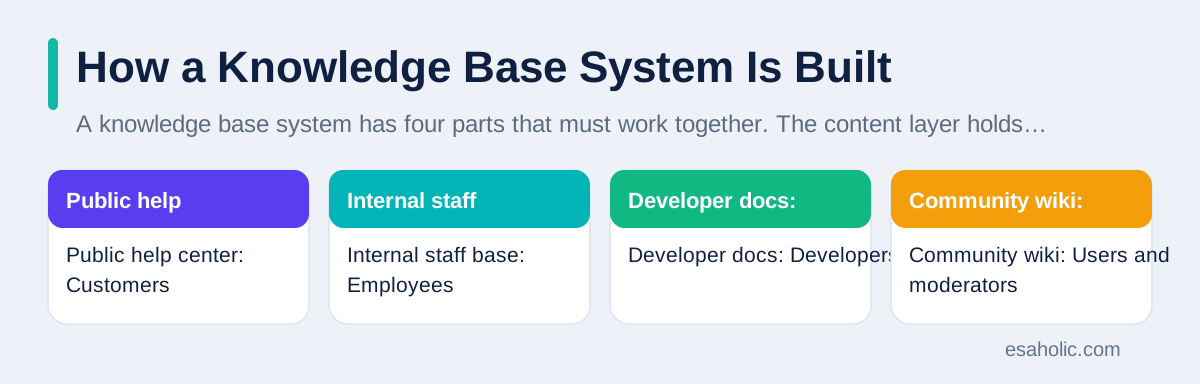
A knowledge base system has four parts that must work together. The content layer holds articles, images, and versions. The search layer indexes that content, which means it builds a fast map of words and meanings so queries return quickly. The presentation layer shows articles in a clean, readable layout on phones and desktops. The feedback layer collects ratings, comments, and search logs, and routes them to owners. A weakness in any part hurts the whole system, because great articles with poor search still leave readers stuck.
Structure comes before volume. Start with ten to twenty categories at most, each named with words readers use, not with internal team names. A category called "Billing and payments" helps a customer far more than a category called "Revenue operations." Inside each category, list the most common questions first, and keep article titles as questions or clear tasks, such as "How do I change my billing address?" A reader who scans a category page should recognise their question in seconds, without opening five pages to check.
Writing standards keep a growing collection consistent. A style guide, which is a short set of writing rules, should cover tone, heading style, how to write steps, how to show warnings, and how to link to related articles. The Google developer documentation style guide offers a practical model for clear, consistent technical writing, and plain language guidance from the US government shows how to cut jargon without losing meaning. A team does not need to copy either guide, but it should adopt rules its writers can actually follow every day.
| Collection type | Main readers | Key controls | Common mistake |
|---|---|---|---|
| Public help center | Customers | Clear search, plain words, human fallback | Hiding help behind a login |
| Internal staff base | Employees | Role access, owners, change notes | Copying one rule into many pages |
| Developer docs | Developers | Code examples, version notes, API links | Examples that no longer run |
| Community wiki | Users and moderators | Moderation, edit history, trusted editors | Letting spam or stale edits stay live |
Choosing Tools Without Regret
Choose a tool by testing it with real work, not by comparing feature lists. Write five real articles in each finalist tool, including one with images, one with a table, and one with a warning box. Search for them as a customer would, on a phone and on a desktop. Ask a reviewer to approve a draft, then publish a correction and check the version history. That half day of testing reveals editing pain, search weakness, and permission gaps that a sales demo hides, and it gives writers a voice in a choice they must live with.
Check the total cost, not only the headline price. Count seats for writers, reviewers, and admins, and check whether readers need accounts. Check limits on articles, storage, and monthly views, and ask what happens when you pass a limit. Check whether analytics, private articles, and custom branding cost extra, because those features often sit in higher plans. A tool that looks cheap but charges extra for private staff pages may cost more than a pricier tool that includes them, so compare plans with the same feature list in hand.
Also check support for the tool itself, because your team will need help at the worst moment, such as during a launch or an outage. Read the vendor help center as a customer would, and judge it by the standard in this guide. A vendor whose own help center is hard to search will likely struggle to help you build yours. Esaholic teams that need a custom setup can explore custom software development, where a help system can fit an existing workflow instead of forcing the workflow to fit a generic tool.
Launch, Measure, and Keep It Alive
Launch with the articles that answer the most tickets, not with a perfect collection. A team that publishes the top thirty questions first will cut tickets within weeks, while a team that waits for two hundred articles will launch late and learn slowly. Announce the help center where readers already ask for help, such as in ticket replies, in chat greetings, and on the support page. Link each launch article from the place a reader already visits, because a help center nobody can find will not help anyone.
Measure four numbers every month. First, the share of visitors who find an article and do not open a ticket, which shows whether self help works. Second, the top failed searches, which show missing content. Third, the articles with the worst feedback, which show pages to rewrite first. Fourth, the age of popular articles, which shows whether review dates mean anything. A team that watches those numbers will improve steadily, while a team that only counts total articles will celebrate growth while readers grow frustrated. For readers who need step by step help, publish the same guidance as a user manual guide alongside the help articles.
Keep the collection alive with a simple weekly routine. Owners review feedback and failed searches, fix the worst page, publish one missing article, and retire or merge one duplicate. Duplicates, which are two pages answering the same question, confuse search and split feedback, so merge them into one stronger page and redirect the old link. That routine takes an hour or two a week for a small team, and it protects the trust a launch builds. A knowledge base is not a project that ends at launch. It is a living product, and readers can tell within one search whether a team still cares for it.
Conclusion
A good knowledge base earns trust one clear answer at a time. It starts with real reader questions, it organises answers so search finds them fast, and it stays current because owners review pages on a schedule and fix the pages readers rate as unhelpful. Choose a tool by testing search, editing, and permissions with real articles, use a free plan as a pilot with a clear goal, and launch with the questions that cause the most tickets. Then keep a weekly routine of fixing, publishing, and retiring pages, so the collection grows more useful every month instead of slowly going stale.
Frequently Asked Questions
What is knowledge base software in simple terms?
Knowledge base software is a tool that stores answers, guides, and procedures in one searchable place, so customers and staff can find help without waiting for a person. It works best when each article answers one question clearly, shows the steps in order, and gets reviewed on a schedule.
Is free knowledge base software good enough for a small team?
Free knowledge base software can work for a small team that writes a modest number of articles and needs basic search and editing. It falls short when a team needs private staff articles, approval workflows, strong search analytics, or support for many editors, so check those limits before you commit your content to it.
How do you keep a knowledge base from going out of date?
You keep a knowledge base current by giving every article an owner, a review date, and a short checklist for each update. You also read search terms that return no results, read feedback on articles, and fix the pages that confuse readers first, because a small set of popular pages usually causes most of the trouble.
Written by Danish Mustafa
Senior Agentic AI Engineer and Systems Architect
Danish Mustafa is a senior agentic AI engineer at Esaholic who builds systems that find trusted answers in real documents and keep them easy to use.
Reviewed by Umar Abbas
Founder, Principal AI Architect and Operator
Umar Abbas is the founder of Esaholic and a principal AI architect who designs reliable large scale AI systems for regulated industries.
Relevant blogs
Technical Documentation: A Simple Guide for Teams
How to plan, write, and keep clear guides that help readers finish a task without guessing.
User Manual Guide: How to Write One That Helps
How to plan, write, and test a manual that helps readers finish a task on the first try.
Intelligent Document Processing: A Simple Guide
How scans, forms, and invoices become clean data teams can search and trust.
User Experience Basics: A Simple Starter Guide
How to design screens people understand, test with real users, and remove friction.
Back to all blog guides · Back to Business and Productivity guides · Explore AI Chatbot Development Services