
What Is WMN? Wireless Mesh Networks Explained
WMN stands for wireless mesh network, which is a Wi-Fi system made of several small devices, called nodes, that talk to each other and share one network name across a home or office, instead of relying on a single router in one corner. A node is simply one unit of the system, usually a small box you plug in and place around the building, and a mesh is the web of connections between those nodes, so data can travel by more than one route. If you have ever had strong Wi-Fi in the living room and almost nothing in a far bedroom, a mesh system is designed to fix exactly that gap, without running long cables through walls.
This guide explains mesh Wi-Fi in plain terms: how nodes work, how a device moves between them, what benefits a mesh system brings, where its limits lie, and when it beats a single router, a range extender, or a wired access point. It also covers placement, cost, security, and the questions to ask before buying, so you can judge whether mesh fits your home, your office, or your small business, and which size of system you actually need.
Mesh Wi-Fi is not magic, and it is not the right answer for every building. It shines in larger homes, in homes with thick walls, and in offices where people move between rooms while on video calls. It is less useful in a small flat where a single good router already covers every room, or in a building where a wired connection is easy to install and far faster. Knowing that difference before you buy saves money and avoids the disappointment of a system that was never needed.
How A Wireless Mesh Network Works
A mesh system starts with one main node, which connects to your internet modem, which is the box that brings the internet into the building, and then to one or more extra nodes placed around the building. All nodes share one network name and one password, so your phone, laptop, or television sees a single network, not a list of different networks for each room. The nodes talk to each other over Wi-Fi, and many systems also allow a wired link between nodes, called a backhaul, which is the connection nodes use to pass traffic between themselves, for faster and more stable performance where a cable is available.
When you move through the building, your device switches from one node to the nearest or strongest node, a process called roaming, which means moving between access points without dropping the connection. Good mesh systems manage that switch for you, steering your device to the best node before the signal weakens enough to break a call. The switch is not always perfect, and an older device may cling to a distant node longer than it should, but modern mesh systems and modern phones handle roaming far better than the separate networks of the past, where you had to switch networks by hand.
Mesh also gives data more than one path. If one node fails or one link weakens, traffic can route through another node, much like taking a different street when one road is closed. That self healing behaviour, which means the network reroutes around a fault on its own, is the feature that gives mesh its name and its reputation for reliability. It does not make the internet itself faster than your plan allows, but it does make the Wi-Fi coverage inside the building more even, which is usually the real problem in a large home.
Nodes, Routers, And Extenders Compared
A single router is one box that creates Wi-Fi for a limited area, and it works well when that area is small and the walls are thin. A range extender, which is a device that repeats a Wi-Fi signal further into a building, can stretch that area, but it often creates a second network name, halves the speed on the repeated link, and forces devices to switch networks by hand. A mesh node, by contrast, is part of one managed system, with one network name, shared settings, and a central app that shows every node, every connected device, and the health of each link.
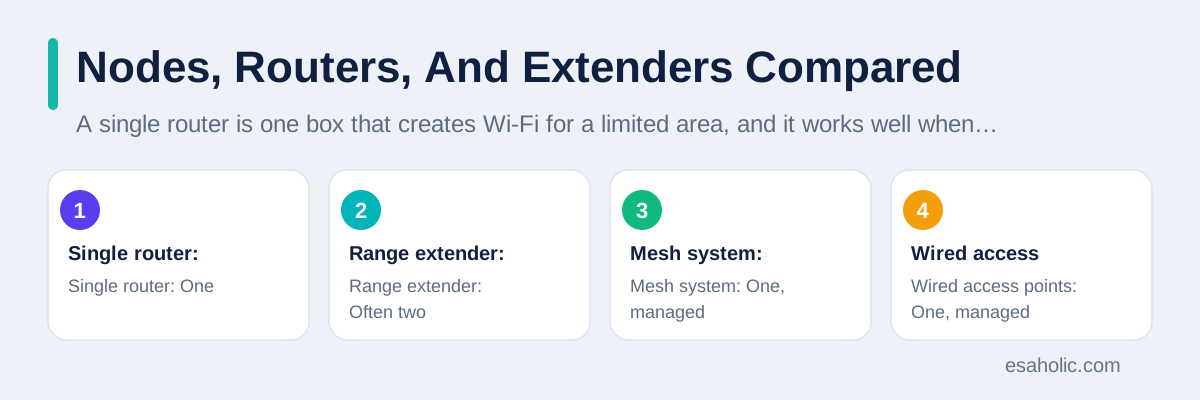
A wired access point, which is a Wi-Fi radio connected back to the router by cable, is often the fastest option of all, because its backhaul does not use Wi-Fi airtime at all. If you can run cables, or if your building already has network ports in several rooms, access points may beat mesh on speed and stability, at the cost of installation work. Mesh sits in the middle: easier to install than wired access points, because nodes only need power, and far smoother than extenders, because the system manages roaming, updates, and settings as one network instead of several competing ones.
The practical difference shows up in daily use. With extenders, a video call may freeze at the moment you walk between rooms, because the device must drop one network and join another. With mesh, the same walk usually passes without a visible break, because the system hands the device over in advance. With a single router, the same walk may simply lose signal in a far room, because no second radio exists to pick it up. The table below sums up these options, so you can match the tool to the building instead of buying the most advertised one.
| Option | Network names | Best for | Main limit |
|---|---|---|---|
| Single router | One | Small spaces | Limited range |
| Range extender | Often two | One extra room, low budget | Slower repeated link |
| Mesh system | One, managed | Large or multi floor spaces | Higher cost, hop slowdown |
| Wired access points | One, managed | Maximum speed, cabled buildings | Installation work |
Benefits Of Mesh Wi-Fi
The first benefit is even coverage. Instead of one strong spot near the router and weak spots elsewhere, mesh places a radio in each part of the building, so bedrooms, kitchens, gardens, and offices all receive a usable signal. The second benefit is simple management: one app controls the whole system, including the network name, the password, guest access, which is a separate limited network for visitors, parental controls, and firmware updates, which are software updates for the nodes themselves. Changing a password once updates every node, instead of requiring a visit to each device.
The third benefit is easy growth. A system that starts with two nodes can add a third later when you extend the house, convert a garage, or open a new office room, without rebuilding the network. The fourth benefit is resilience, because traffic can reroute around a failed node, as noted earlier, so one unplugged node weakens coverage in one area instead of taking the whole network down. For families, the shared app also makes it easier to see which devices are online, pause the internet for a child device at bedtime, or give a guest a temporary password without sharing the main one.
For a small office, mesh adds one more benefit: consistent video calls as people move. A team member can walk from a desk to a meeting room while staying on the same call, without the freeze that comes from switching networks. That benefit matters more as hybrid work grows, because the office network must now support calls in corridors, lounges, and meeting rooms, not just at fixed desks. Our guide on how distributed systems spread work across machines describes the same spread out idea in wider terms, and our custom software development services use mesh style thinking when we design office networks for clients.
Limits And Costs To Know Before Buying
Mesh is not free speed. Each wireless hop, which is one jump of data from one node to another, uses Wi-Fi airtime, so a device two hops from the main node will usually be slower than a device connected directly to it, even when the signal looks strong. That is why wired backhaul matters so much: a node connected by cable does not spend Wi-Fi time talking to the main node, so it can spend all its Wi-Fi time serving your devices. If you cannot run cables, place nodes so each one has a strong link to the main node or to a wired node, rather than chaining many wireless hops in a row.
Cost is the second limit. A mesh system costs more than a single router, and a three node system costs more again, so a small flat may pay for coverage it never needs. Compatibility is a third limit: nodes from different brands, and sometimes from different product lines of the same brand, do not always mesh together, so expanding a system may mean staying with the same brand. Check the product line carefully before buying, and confirm that extra nodes are still sold separately, so a future extension does not force a whole new system.
A fourth limit is that mesh cannot fix a slow internet plan, a faulty modem, or interference, which means competing signals from neighbours, microwaves, or thick walls that block radio waves. If every device is slow even beside the main node, the problem is the internet connection or the modem, not the coverage, and mesh will not help. Test the speed beside the main node first, compare it with the speed your plan promises, and fix that bottleneck before spending on extra nodes. Guidance from the Wi-Fi Alliance on modern Wi-Fi and the Wi-Fi Alliance home page explains the standards behind these systems, and the Internet Engineering Task Force publishes the internet standards that mesh networks rely on.
Placing Nodes For The Best Result
Placement matters more than brand, and a few simple rules cover most homes. Place the main node near the modem, in an open spot, not inside a closed cabinet or behind a television, because a hidden radio starts weak before it even leaves the room. Place extra nodes no more than two rooms away from the main node or from another strong node, at about waist to chest height, in the open, and away from thick metal objects, aquariums, and microwave ovens, all of which block or disturb radio signals. A node in a hallway often covers two rooms better than a node hidden in one far bedroom.
Avoid the two most common placement mistakes. The first is placing a node in the dead spot itself, which is the room with almost no signal, because a node that cannot hear the main node well cannot repeat a strong signal either. Move it one room closer, where it still receives a good signal, and let it serve the dead spot from there. The second mistake is placing nodes too close together, which wastes a node and creates interference, where nearby radios compete for the same airtime. The mesh app usually shows link quality for each node, so use that reading, not guesswork, to fine tune the final spots.
After placement, test the result the way you actually use it. Walk through the building on a video call, stream a video in the farthest room, and check the speed in each room at the same time of day you normally work. If one room still struggles, try moving its node a metre or two, raising it onto a shelf, or connecting it by cable if a port is nearby. Small moves often beat new hardware, and a system tuned by testing will outperform a larger system placed by guesswork every time.
Mesh Versus A Single Router: How To Choose
Choose mesh when the building is large, has more than one floor, has thick walls, or has dead spots that a single router cannot reach even after moving it to a central spot. Choose mesh when people move between rooms on calls, when many devices share the network at once, and when you want one app to manage the whole system. A two node system usually suits a medium home or a small office, while a three node system suits a large home, a two floor house, or an office with several meeting rooms.
Choose a single router when the space is small, when one central router already covers every room well, or when your budget is tight and the current router is modern. A single high quality router with up to date Wi-Fi can cover a flat or a small house better than a cheap mesh system, because one strong radio beats three weak ones. Also choose wired access points over mesh when cables are easy to install and maximum speed matters, such as for a gaming room, a video editing desk, or a server that moves large files all day.
To decide, run a simple test before buying: stand in the farthest room with your phone, check the signal strength and run a speed test, then move the router to the most central spot you can and test again. If the far room still struggles after a central move, mesh is likely worth it. If the far room improves to a usable speed, a better router position, or a single better router, may solve the problem for far less money. Buy for the test result, not for the box size, and keep the receipt until you have tested the new system in every room.
If the whole home should share one protected connection, what is a VPN router covers the router option.
Security And Management Basics
A mesh system is still a Wi-Fi network, so the same security basics apply. Use a strong, unique password for the Wi-Fi network, use the newest security mode the system offers, which is usually WPA3, a security standard that protects Wi-Fi traffic, or WPA2 where older devices require it, and change the default administrator password for the mesh app or web page. Keep firmware updated, because updates fix security holes and improve roaming, and turn on automatic updates where the app offers them, so a forgotten system does not stay vulnerable for months.
Use the guest network for visitors, for smart home gadgets you do not fully trust, and for any device that only needs internet access, not access to your computers or printers. A guest network separates those devices from the main network, so a compromised gadget cannot easily reach your files. Review the connected devices list once a month, remove devices you no longer recognise, and pause or remove old devices that no longer need access. These checks take minutes in the mesh app, and they catch the forgotten tablet, the old phone, and the guest device that should have left weeks ago.
For an office, add one more layer: separate networks for staff, guests, and smart devices, a written password policy, and a named person who owns updates and reviews. A mesh app can enforce those separations, but only if someone sets them up and checks them, so assign that job clearly instead of assuming the system manages itself. Security is a routine, not a purchase, and a mesh system managed well is far safer than a single router whose password has not changed since installation day.
A mesh network still needs protection for all its traffic, and our guide to virtual private networks explains how encrypted tunnels work.
The Future Of Mesh Wi-Fi
Mesh Wi-Fi keeps improving as Wi-Fi standards advance. Newer standards bring wider channels, which are slices of radio spectrum that carry data, better handling of many devices at once, and lower delay for calls and games, and mesh systems adopt those standards node by node as hardware refreshes. Wired backhaul options are also growing, with some systems supporting a fast wired link over existing home wiring, which reduces the wireless hop penalty without new cables. These advances make mesh smoother, but they do not change the basic decision: mesh helps coverage, not internet speed, and placement still matters more than the newest label.
Smart home growth also pushes mesh forward, because dozens of small devices, from lights to sensors to cameras, all need a stable connection in every room. A mesh system that can handle many low power devices, separate them onto a guest or device network, and keep them online after a node restart will matter more than raw speed for many households. When you compare future systems, ask about device capacity, guest separation, and update policy, not only about headline speed, because those features decide whether the system stays pleasant to live with after the first month.
If you remember one idea from this guide, make it this one: a wireless mesh network is a team of radios sharing one network, so data finds the best path and devices move between rooms without dropping. Buy it when coverage, movement, or thick walls are the real problem, place nodes by testing link quality, wire the backhaul where you can, and keep security updated. Done that way, mesh turns a frustrating patchwork of strong and dead spots into one calm network that simply works, room after room.
Conclusion
WMN means wireless mesh network: a set of nodes that share one network name, pass traffic between themselves, and hand your device from node to node as you move, so coverage stays even across a home or office. Mesh beats a single router in large, multi floor, or thick walled buildings, and it beats extenders on roaming and management, while wired access points still win on raw speed where cables are easy. Place nodes by testing link quality, wire the backhaul where you can, keep security and firmware updated, and buy the system size your speed test actually justifies, not the largest box on the shelf.
Frequently Asked Questions
What is WMN in simple terms?
WMN means wireless mesh network. It is a Wi-Fi system of several nodes that talk to each other and share one network name, so coverage stays even across a home or office and devices move between nodes without dropping the connection.
Is mesh Wi-Fi better than a single router?
Mesh Wi-Fi is better in large, multi floor, or thick walled buildings with dead spots, and when people move between rooms on calls. A single good router is better, and cheaper, in a small space where it already covers every room well.
Does mesh Wi-Fi make the internet faster?
No. Mesh improves Wi-Fi coverage inside the building, but it cannot exceed the speed of your internet plan. If speed is slow even beside the main node, fix the internet connection or modem first, because extra nodes will not help.
Written by Danish Mustafa
Senior Agentic AI Engineer and Systems Architect
Danish Mustafa is a senior agentic AI engineer and systems architect who designs controlled multi-step AI systems with clear limits on what they can do.
Reviewed by Ahmad Jajja
Senior AI Research Engineer and Generative AI Specialist
Ahmad Jajja is a senior AI research engineer at Esaholic who specializes in generative AI and data systems grounded in real documents.
Relevant blogs
What Is a Distributed System? A Simple Guide
How spreading work across many machines changes reliability and cost.
Multipoint Control Unit Explained: How Video Meetings Mix
What an MCU does in video calls, how it mixes video and audio, and how it differs from an SFU.
What Is a Sandbox Environment? A Simple Guide
How isolated test spaces keep risky files and links away from your main system.
What Is a Kernel? A Simple OS Guide
How the core of an operating system manages programs, memory, and hardware.
Back to all blog guides · Back to Cybersecurity and Networking guides · Explore related Esaholic services